The hardest thing about a custom phone grip is not the printing. It is the size. The decorated face of a collapsible grip is only about 1.5 inches across (roughly 38 mm), which is smaller than a poker chip. A logo that looks crisp on a laptop screen can turn muddy, cramped, or off-center once it is reproduced inside that little circle. Getting the artwork right before you order is what separates a grip people are proud to stick on their phone from one that goes in a drawer. This walkthrough covers how to set up files that print cleanly the first time.
Start from the real print area, not the whole grip
A standard collapsible grip has a top button that sits flush when collapsed (about a quarter inch tall) and rises to roughly nine tenths of an inch when extended. The printable surface is the flat top of that button, and across most manufacturers it lands close to a 1.5-inch diameter circle. Treat that circle as your entire canvas. Build your design at final size in a 1.5-inch round frame so you are judging it at the scale a customer will actually see, then keep the important elements away from the very edge. A safe margin of about an eighth of an inch inside the rim protects your logo from the slight drift that happens when a printed disc is trimmed and seated. If your art runs to the edge on purpose, extend the background a little past the circle so there is bleed to trim into rather than a thin white halo.
Round print areas punish busy layouts. Wordmarks that are long and horizontal shrink to illegibility inside a circle, so a stacked lockup or an icon-only mark usually reads far better at this size. If your brand has a simplified badge or monogram, this is the place to use it.
Build in vector whenever you can
Most decorators say the same thing: they accept many file types but prefer vector art. The reason is resolution. Vector files (AI, EPS, or PDF built from vectors) describe shapes as math, so they stay razor sharp whether they are printed on a grip or a billboard. That makes them ideal for logos, type, and flat-color graphics, and it removes any guesswork about pixel density.
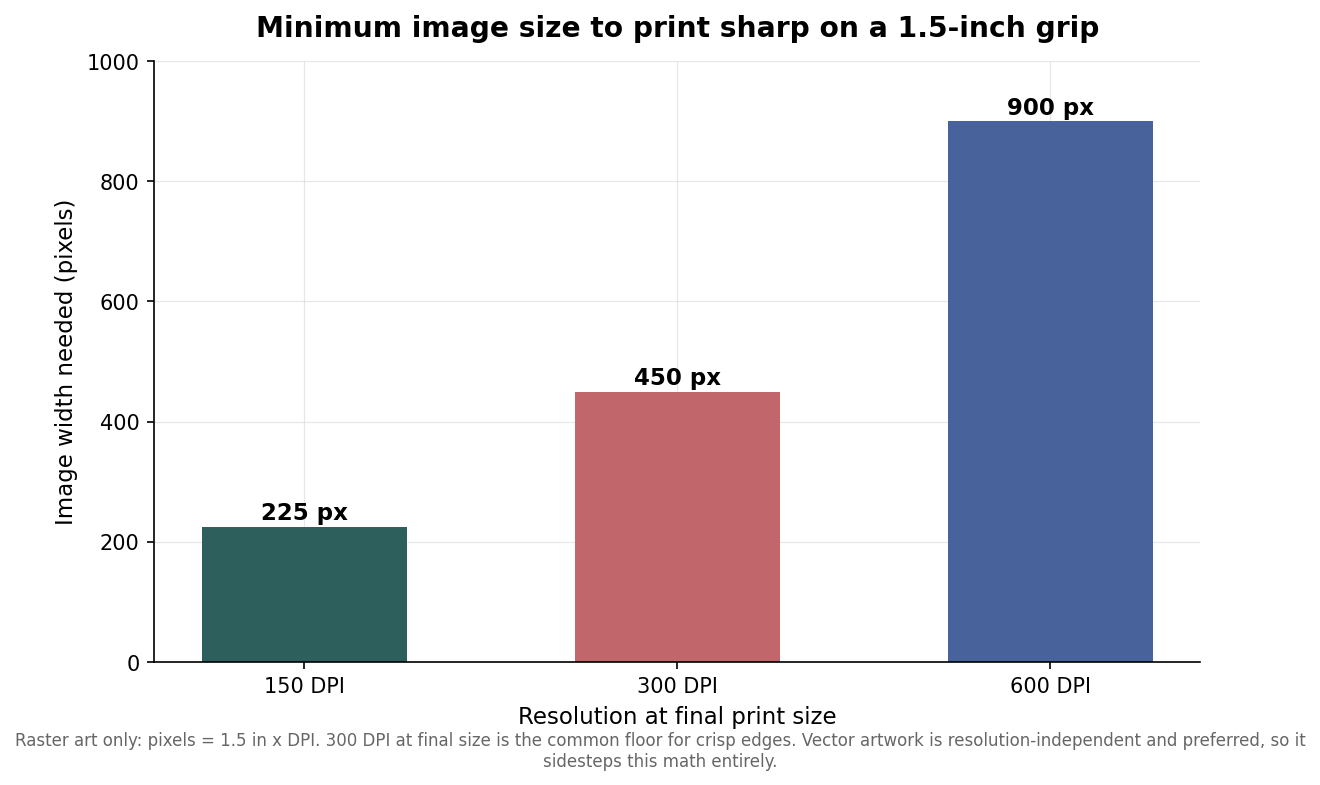
If you only have a raster file, such as a JPG or PNG, the resolution has to be high enough at final print size. Because the print is only 1.5 inches wide, the math is simple: multiply 1.5 by your target DPI. At 150 DPI you need a 225-pixel-wide image, at 300 DPI you need 450 pixels, and at 600 DPI you need 900 pixels. Three hundred DPI at final size is the common floor for clean edges, so a photo that is at least 450 pixels across in the area that will be printed is the minimum you want to send. A logo pulled from a website at 96 DPI will almost always look soft; ask for the original vector instead.
Decide how many colors, because it changes the price
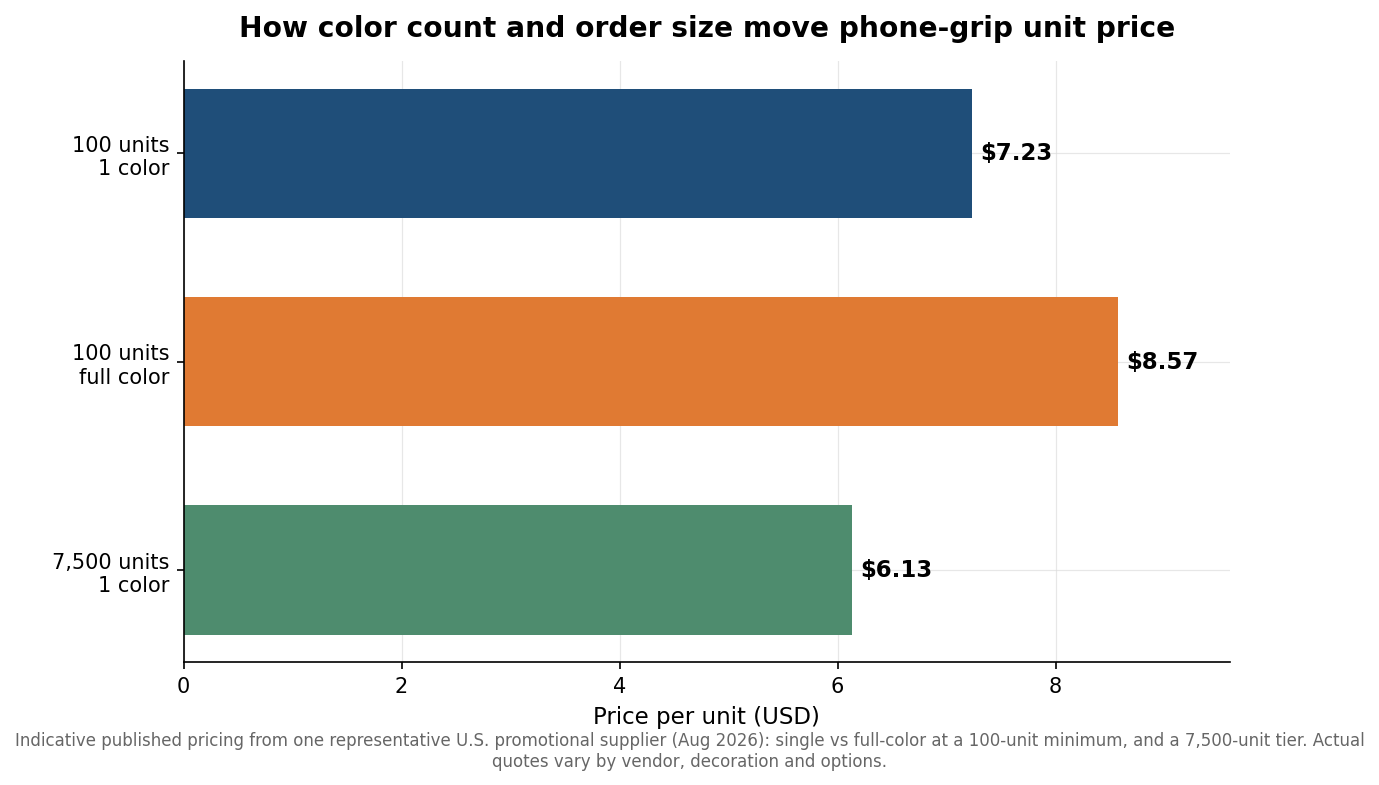
Color count is the single biggest lever on unit cost for grips. A one-color imprint (your mark in a single ink) is the cheapest route and works beautifully for a clean logo. Full-color printing, which handles gradients, photos, and multi-color artwork, costs more per unit because it is a different process. As a concrete reference point, one representative U.S. promotional supplier lists collapsible grips at about $7.23 each for a single color and $8.57 each for full color at a 100-unit minimum, with the single-color price easing toward roughly $6.13 at 7,500 units. Those are indicative published figures rather than a universal rate, and real quotes move with vendor, decoration method, and add-ons, but the shape holds everywhere: more colors cost more, and larger runs cost less per piece.
Set your file up to match the method you are paying for. For a one-color job, deliver the art as a single solid spot color, ideally with a Pantone reference so the ink matches your brand rather than a printer’s best guess. For full color, work in CMYK rather than RGB, since screen colors are brighter than anything ink can reproduce and a vivid RGB blue often prints duller than expected. Converting to CMYK yourself lets you catch that shift before it becomes a surprise on the proof.
Remember the grip is stuck to a phone
Artwork is only half the product. Collapsible grips attach with a repositionable gel adhesive that is designed to peel and re-stick, and it bonds best to smooth, hard surfaces such as a hard-shell case or bare glass. It grips poorly on silicone, textured, leather, or heavily water-repellent cases, which is worth flagging to whoever will be handing these out. Because the adhesive covers the back where a wireless charging coil would sit, a stuck-on grip generally blocks flat wireless and MagSafe charging unless you choose a version built specifically to fold flat or mount magnetically. If your recipients live on wireless charging, factor that into which style you order before you finalize art.
Plan for proofing, quantity, and lead time
Minimum orders for custom grips commonly start around 100 pieces, which keeps them accessible for a single event or a small team while still hitting a workable per-unit cost. After you approve a digital proof, typical production runs about two to three weeks before the order ships, so a grip you need in hand for a conference should be finalized roughly a month ahead to leave room for shipping and any reprint. Always insist on that digital proof and check three things on it: that your logo sits centered in the circle, that the color reads the way you intend, and that no small text has collapsed at this size. A proof is the cheapest reprint insurance you will ever get, because catching a cramped wordmark on screen costs nothing, while catching it on 500 finished grips costs the whole run.
Set up the file thoughtfully and a phone grip becomes some of the most cost-effective branded merchandise you can buy: small, genuinely useful, and carried in a pocket every day. Rush the artwork and that same small canvas will expose every shortcut. The work is mostly front-loaded, and it is worth doing before the order, not after.
Leave a Reply